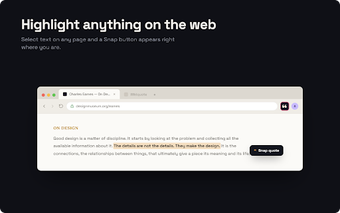
Pullquote: capture exact web excerpts and share precise links
Pullquote, from pullquote.to, is a Chrome extension that converts selected webpage text into context-preserving links and saves precise excerpts for later reference. It supports social posting so users can publish exact quotes rather than paraphrases, while offering searchable storage for collected snippets. The extension targets researchers, students, content curators, and social media managers who regularly capture, organize, or share notable passages from the web.
Creating a pull quote is a highlight-and-action workflow users recognize quickly
Pullquote uses a simple capture flow: highlight text, then use the Pullquote menu or the right-click menu to generate a shareable item. That process supports three clear outcomes: saving to the collection, generating a direct link, or sending content to social networks. The extension therefore fits a short, repeatable sequence for people who collect evidence or pass precise excerpts to colleagues.
Collections and MUSE extend the extension into a lightweight research database
MUSE provides a personal feed for musings and uncoupled notes added in late 2024, while collection and indexing tools let users organize saved snippets. The extension stores entries with metadata, which helps when assembling research or building source lists. Typical tasks include tagging excerpts, searching saved items, and annotating quotes for later retrieval.
Privacy posture is explicit; installation shows standard browser warnings
The Chrome installer displays a history-access warning at install time, and the developer states that only explicitly shared items, such as posted tweets, are stored with personal identifiers while other data is aggregated. Pullquote also supports the browser's native text-fragment highlighting so generated links highlight passages for recipients even when the extension is not installed.
Compatibility and Pro controls aim at social managers and power users
Pullquote runs on Chrome and other Chromium-based browsers, which suits teams that standardize on that engine. The Pro tier adds tweet scheduling, font customization, and multi-account support, features that address social publishing workflows and account management. These extras are practical for users who publish frequently and need per-quote styling or scheduled posts.
Best for habitual sharers and researchers; less essential for occasional users
Pullquote is a practical option for researchers and social media managers who regularly point readers to specific passages, because it supports targeted citation and curated collections. Casual sharers gain less from installing another browser extension. A sensible approach is to test the extension in a secondary browser profile and enable only the features you use most before adding it to a main workflow.